<?xml version="1.0" encoding="utf-8"?><feed xmlns="http://www.w3.org/2005/Atom" ><generator uri="https://jekyllrb.com/" version="3.10.0">Jekyll</generator><link href="https://desa-eapd.github.io//Type-on-Strap-master/feed.xml" rel="self" type="application/atom+xml" /><link href="https://desa-eapd.github.io//Type-on-Strap-master/" rel="alternate" type="text/html" /><updated>2025-02-04T22:20:01+00:00</updated><id>https://desa-eapd.github.io//Type-on-Strap-master/feed.xml</id><title type="html">A project by UNDESA</title><subtitle>A website with blog posts and pages</subtitle><entry><title type="html">Dark Mode</title><link href="https://desa-eapd.github.io//Type-on-Strap-master/demo/2021/04/27/dark-mode.html" rel="alternate" type="text/html" title="Dark Mode" /><published>2021-04-27T00:00:00+00:00</published><updated>2021-04-27T00:00:00+00:00</updated><id>https://desa-eapd.github.io//Type-on-Strap-master/demo/2021/04/27/dark-mode</id><content type="html" xml:base="https://desa-eapd.github.io//Type-on-Strap-master/demo/2021/04/27/dark-mode.html"><![CDATA[<p>More colors with less light. Click the <strong>half-moon</strong> most top-right button to turn the lights ON/OFF.
Here is a bit of everything, so you can check how the theme look, have fun! 👌</p>

<h1 id="headers">Headers</h1>
<h2 id="level-2">Level 2</h2>
<h3 id="level-3">Level 3</h3>
<h4 id="level-4">Level 4</h4>
<h5 id="level-5">Level 5</h5>
<h6 id="level-6">Level 6</h6>

<h1 id="headers-with-links"><a href="http://localhost">Headers with links</a></h1>
<h2 id="level-2-1"><a href="http://localhost">Level 2</a></h2>
<h3 id="level-3-1"><a href="http://localhost">Level 3</a></h3>
<h4 id="level-4-1"><a href="http://localhost">Level 4</a></h4>
<h5 id="level-5-1"><a href="http://localhost">Level 5</a></h5>
<h6 id="level-6-1"><a href="http://localhost">Level 6</a></h6>

<h2 id="code-highlight">Code highlight</h2>
<p>Mode specific code highlighting themes. <a href="https://kramdown.gettalong.org/">Kramdown</a> which is responsible for the color highlighting may be more limited than your IDE.</p>

<div class="language-python highlighter-rouge"><div class="highlight"><pre class="highlight"><code><span class="c1">#!/usr/bin/env python
</span><span class="s">"""
Test file for syntax
"""</span>
<span class="c1"># TODO: Use dark mode
</span><span class="kn">from</span> <span class="nn">sys</span> <span class="kn">import</span> <span class="n">os</span>

<span class="k">def</span> <span class="nf">foo</span><span class="p">(</span><span class="n">bar</span><span class="p">):</span> 
    <span class="k">try</span><span class="p">:</span>
        <span class="k">print</span><span class="p">(</span><span class="n">bar</span><span class="p">)</span>
    <span class="k">except</span> <span class="nb">NameError</span><span class="p">:</span>
        <span class="k">print</span><span class="p">(</span><span class="s">"Variable bar is not defined"</span><span class="p">)</span>


<span class="k">class</span> <span class="nc">Bar</span><span class="p">(</span><span class="nb">object</span><span class="p">):</span> 
    <span class="k">def</span> <span class="nf">__init__</span><span class="p">(</span><span class="bp">self</span><span class="p">):</span>
        <span class="n">foo</span><span class="p">(</span><span class="mi">1</span><span class="p">)</span>
        <span class="bp">self</span><span class="p">.</span><span class="n">octal</span> <span class="o">=</span> <span class="s">'</span><span class="se">\04</span><span class="s">'</span>
        <span class="bp">self</span><span class="p">.</span><span class="n">text</span> <span class="o">=</span> <span class="s">"""Example </span><span class="se">\t\n</span><span class="s">"""</span>
    
    <span class="k">def</span> <span class="nf">__exit__</span><span class="p">(</span><span class="bp">self</span><span class="p">,</span> <span class="o">*</span><span class="n">args</span><span class="p">):</span>
        <span class="k">print</span><span class="p">(</span><span class="s">'exit</span><span class="se">\u1111\xFF</span><span class="s">'</span><span class="p">)</span>
        <span class="k">pass</span>
    
    <span class="o">@</span><span class="nb">staticmethod</span>
    <span class="k">def</span> <span class="nf">example</span><span class="p">():</span>
        <span class="k">assert</span> <span class="p">(</span><span class="mf">1.0</span> <span class="ow">and</span> <span class="il">2L</span><span class="p">)</span> <span class="ow">or</span> <span class="bp">True</span>
        <span class="k">return</span> <span class="p">{</span> <span class="s">"example"</span><span class="p">:</span> <span class="p">[(</span><span class="mi">1</span><span class="p">,),</span> <span class="p">(</span><span class="sa">r</span><span class="s">'raw'</span><span class="p">,</span> <span class="sa">u</span><span class="s">'unicode'</span><span class="p">)]}</span>
</code></pre></div></div>

<h2 id="tables">Tables</h2>

<table>
  <thead>
    <tr>
      <th>hex</th>
      <th>dec</th>
      <th>oct</th>
    </tr>
  </thead>
  <tbody>
    <tr>
      <td>0</td>
      <td>0</td>
      <td>0</td>
    </tr>
    <tr>
      <td>5</td>
      <td>5</td>
      <td>5</td>
    </tr>
    <tr>
      <td>A</td>
      <td>10</td>
      <td>12</td>
    </tr>
    <tr>
      <td>F</td>
      <td>16</td>
      <td>20</td>
    </tr>
    <tr>
      <td>F5</td>
      <td>21</td>
      <td>25</td>
    </tr>
  </tbody>
</table>

<h2 id="katex">KaTeX</h2>

<p>Some KaTeX diagrams to check in dark mode:</p>

\[\begin{CD}
A @&gt;a&gt;&gt; B \\
@VbVV @AAcA \\
C @= D
\end{CD}\]

\[\utilde{AB}\]

<h2 id="mermaid">Mermaid</h2>

<div class="mermaid">
flowchart TB
    c1--&gt;a2
    subgraph one
    a1--&gt;a2
    end
    subgraph two
    b1--&gt;b2
    end
    subgraph three
    c1--&gt;c2
    end
</div>]]></content><author><name></name></author><category term="Demo" /><category term="Katex" /><category term="Mermaid" /><category term="Markdown" /><summary type="html"><![CDATA[More colors with less light. Click the half-moon most top-right button to turn the lights ON/OFF. Here is a bit of everything, so you can check how the theme look, have fun! 👌]]></summary></entry><entry><title type="html">Tech Stuff example</title><link href="https://desa-eapd.github.io//Type-on-Strap-master/2019/11/02/Tech-stuff-example.html" rel="alternate" type="text/html" title="Tech Stuff example" /><published>2019-11-02T00:00:00+00:00</published><updated>2019-11-02T00:00:00+00:00</updated><id>https://desa-eapd.github.io//Type-on-Strap-master/2019/11/02/Tech-stuff-example</id><content type="html" xml:base="https://desa-eapd.github.io//Type-on-Strap-master/2019/11/02/Tech-stuff-example.html"><![CDATA[<p>Let’s demo some code snippet, with some mermaid diagrams.
Because if you put some code in your blog, you would at least make it:</p>
<ol>
  <li>Searchable</li>
  <li>Good-looking</li>
</ol>

<h2 id="search-on-code">Search on code</h2>

<p>Search should be working even for complicated escape symbols.</p>

<div class="language-bash highlighter-rouge"><div class="highlight"><pre class="highlight"><code><span class="nb">sed</span> <span class="nt">-i</span> <span class="s1">'s/\"hostname\"\:.*$/\"hostname\"\: \"'</span><span class="nv">$IPADDR</span><span class="s1">'\"\,/g'</span> open-falcon/agent/config/cfg.json
</code></pre></div></div>

<p>Or try searching for partial of a command, like this article should be returned when looking for “find grep”</p>

<div class="language-bash highlighter-rouge"><div class="highlight"><pre class="highlight"><code>find /etc <span class="nt">-type</span> f <span class="nt">-exec</span> <span class="nb">cat</span> <span class="s1">'{}'</span> <span class="se">\;</span> | <span class="nb">tr</span> <span class="nt">-c</span> <span class="s1">'.[:digit:]'</span> <span class="s1">'\n'</span> | <span class="nb">grep</span> <span class="s1">'^[^.][^.]*\.[^.][^.]*\.[^.][^.]*\.[^.][^.]*$'</span>
</code></pre></div></div>

<h2 id="code-highlighting-examples">Code highlighting examples</h2>

<p>Because you might put code in your blog post, and you want to make sure it will look good in here. Plus that the search
function will still be working!</p>

<h3 id="xml">XML</h3>

<p>Example from <a href="https://www.w3.org/standards/xml/core">W3C</a></p>
<div class="language-xml highlighter-rouge"><div class="highlight"><pre class="highlight"><code><span class="nt">&lt;part</span> <span class="na">number=</span><span class="s">"1976"</span><span class="nt">&gt;</span>
  <span class="nt">&lt;name&gt;</span>Windscreen Wiper<span class="nt">&lt;/name&gt;</span>
  <span class="nt">&lt;description&gt;</span>The Windscreen wiper
    automatically removes rain
    from your windscreen, if it
    should happen to splash there.
    It has a rubber <span class="nt">&lt;ref</span> <span class="na">part=</span><span class="s">"1977"</span><span class="nt">&gt;</span>blade<span class="nt">&lt;/ref&gt;</span>
    which can be ordered separately
    if you need to replace it.
  <span class="nt">&lt;/description&gt;</span>
<span class="nt">&lt;/part&gt;</span>
</code></pre></div></div>

<h3 id="java">Java</h3>

<p>java example</p>

<div class="language-java highlighter-rouge"><div class="highlight"><pre class="highlight"><code><span class="kn">import</span> <span class="nn">java.util.*</span><span class="o">;</span>

<span class="nd">@Example</span>
<span class="kd">public</span> <span class="kd">class</span> <span class="nc">Demo</span> <span class="o">{</span>
  <span class="kd">private</span> <span class="kd">static</span> <span class="kd">final</span> <span class="nc">String</span> <span class="no">CONSTANT</span> <span class="o">=</span> <span class="s">"String"</span><span class="o">;</span>
  <span class="kd">private</span> <span class="nc">Object</span> <span class="n">o</span><span class="o">;</span>
  <span class="cm">/**
   * Creates a new demo.
   * @param o The object to demonstrate.
   */</span>
  <span class="kd">public</span> <span class="nf">Demo</span><span class="o">(</span><span class="nc">Object</span> <span class="n">o</span><span class="o">)</span> <span class="o">{</span>
    <span class="k">this</span><span class="o">.</span><span class="na">o</span> <span class="o">=</span> <span class="n">o</span> <span class="o">!==</span> <span class="kc">null</span> <span class="o">?</span> <span class="n">o</span> <span class="o">:</span> <span class="k">new</span> <span class="nc">Object</span><span class="o">();</span>
    <span class="nc">String</span> <span class="n">s</span> <span class="o">=</span> <span class="no">CONSTANT</span> <span class="o">+</span> <span class="s">"Other example of text"</span><span class="o">;</span>
    <span class="kt">int</span> <span class="n">i</span> <span class="o">=</span> <span class="mi">123</span> <span class="o">-</span> <span class="mi">33</span> <span class="o">%</span> <span class="mi">11</span><span class="o">;</span>
  <span class="o">}</span>
  <span class="kd">public</span> <span class="kd">static</span> <span class="kt">void</span> <span class="nf">main</span><span class="o">(</span><span class="nc">String</span><span class="o">[]</span> <span class="n">args</span><span class="o">)</span> <span class="o">{</span>
    <span class="nc">Demo</span> <span class="n">demo</span> <span class="o">=</span> <span class="k">new</span> <span class="nc">Demo</span><span class="o">();</span>
    <span class="nc">System</span><span class="o">.</span><span class="na">out</span><span class="o">.</span><span class="na">println</span><span class="o">(</span><span class="n">demo</span><span class="o">.</span><span class="na">o</span><span class="o">.</span><span class="na">toString</span><span class="o">())</span>
  <span class="o">}</span>
<span class="o">}</span>
</code></pre></div></div>

<h3 id="javascript">Javascript</h3>

<div class="language-javascript highlighter-rouge"><div class="highlight"><pre class="highlight"><code><span class="cm">/**
 * Does a thing
 */</span>
<span class="kd">function</span> <span class="nx">helloWorld</span><span class="p">(</span><span class="nx">param1</span><span class="p">,</span> <span class="nx">param2</span><span class="p">)</span> <span class="p">{</span>
    <span class="kd">const</span> <span class="nx">example</span> <span class="o">=</span> <span class="s2">`hello </span><span class="p">${</span><span class="nx">param1</span><span class="p">}</span><span class="s2">`</span>
    <span class="kd">var</span> <span class="nx">something</span> <span class="o">=</span> <span class="p">{</span>
        <span class="na">key</span><span class="p">:</span> <span class="dl">"</span><span class="s2">value</span><span class="dl">"</span><span class="p">,</span>
        <span class="na">number</span><span class="p">:</span> <span class="mi">1</span>
    <span class="p">};</span>

    <span class="c1">// Do something</span>
    <span class="k">if</span> <span class="p">(</span><span class="mf">2.0</span> <span class="o">%</span> <span class="mi">2</span> <span class="o">==</span> <span class="nx">something</span><span class="p">)</span> <span class="p">{</span>
        <span class="nx">console</span><span class="p">.</span><span class="nx">log</span><span class="p">(</span><span class="dl">'</span><span class="s1">Hello, world!</span><span class="dl">'</span><span class="p">);</span>
    <span class="p">}</span> <span class="k">else</span> <span class="p">{</span>
        <span class="k">return</span> <span class="kc">null</span><span class="p">;</span>
    <span class="p">}</span>

    <span class="c1">// TODO comment</span>
<span class="p">}</span>
</code></pre></div></div>

<h3 id="json">JSON</h3>

<div class="language-json highlighter-rouge"><div class="highlight"><pre class="highlight"><code><span class="p">{</span><span class="w">
  </span><span class="nl">"animals"</span><span class="p">:</span><span class="w"> </span><span class="p">{</span><span class="w">
    </span><span class="nl">"tiger"</span><span class="p">:</span><span class="w"> </span><span class="p">{</span><span class="w">
      </span><span class="nl">"name"</span><span class="p">:</span><span class="w"> </span><span class="s2">"tiger"</span><span class="p">,</span><span class="w">
      </span><span class="nl">"images"</span><span class="p">:</span><span class="w"> </span><span class="p">[</span><span class="s2">"🐯"</span><span class="p">,</span><span class="w"> </span><span class="s2">"🐅"</span><span class="p">,</span><span class="w"> </span><span class="s2">"⻁"</span><span class="p">]</span><span class="w">
    </span><span class="p">},</span><span class="w">
    </span><span class="nl">"turtle"</span><span class="p">:</span><span class="w"> </span><span class="p">{</span><span class="w">
      </span><span class="nl">"age"</span><span class="p">:</span><span class="w"> </span><span class="mi">126</span><span class="p">,</span><span class="w">
      </span><span class="nl">"image"</span><span class="p">:</span><span class="w"> </span><span class="s2">"🐢"</span><span class="w">
    </span><span class="p">},</span><span class="w">
    </span><span class="nl">"unicorn"</span><span class="p">:</span><span class="w"> </span><span class="p">{</span><span class="w">
      </span><span class="nl">"doesExist"</span><span class="p">:</span><span class="w"> </span><span class="kc">true</span><span class="p">,</span><span class="w">
      </span><span class="nl">"image"</span><span class="p">:</span><span class="w"> </span><span class="s2">"🦄"</span><span class="w">
    </span><span class="p">}</span><span class="w">
  </span><span class="p">}</span><span class="w">
</span><span class="p">}</span><span class="w">
</span></code></pre></div></div>

<h3 id="python">Python</h3>

<div class="language-python highlighter-rouge"><div class="highlight"><pre class="highlight"><code><span class="kn">import</span> <span class="nn">os</span>


<span class="k">def</span> <span class="nf">some_function</span><span class="p">(</span><span class="n">param_one</span><span class="o">=</span><span class="s">""</span><span class="p">,</span> <span class="n">param_two</span><span class="o">=</span><span class="mi">0</span><span class="p">):</span>
    <span class="sa">r</span><span class="s">'''A docstring'''</span>
    <span class="k">if</span> <span class="n">param_one</span> <span class="o">&gt;</span> <span class="n">param_two</span><span class="p">:</span>  <span class="c1"># interesting
</span>        <span class="k">print</span><span class="p">(</span><span class="s">"Greater"</span><span class="p">)</span>
    <span class="k">return</span> <span class="p">(</span><span class="n">param_two</span> <span class="o">-</span> <span class="n">param_one</span> <span class="o">+</span> <span class="mi">1</span> <span class="o">+</span> <span class="mb">0b10</span><span class="p">)</span> <span class="ow">or</span> <span class="bp">None</span>


<span class="k">class</span> <span class="nc">SomeClass</span><span class="p">:</span>
    <span class="s">""" dunno what I am doing """</span>

    <span class="k">def</span> <span class="nf">__init__</span><span class="p">(</span><span class="bp">self</span><span class="p">):</span>
        <span class="k">pass</span>
</code></pre></div></div>

<h3 id="yaml">YAML</h3>

<p>You can also render some yaml, like this <code class="language-plaintext highlighter-rouge">_config.yml</code>:</p>

<div class="language-yml highlighter-rouge"><div class="highlight"><pre class="highlight"><code>
<span class="c1"># Welcome to Jekyll!</span>
<span class="c1">#</span>
<span class="c1"># This config file is meant for settings that affect your whole blog, values</span>
<span class="c1"># which you are expected to set up once and rarely edit after that. If you find</span>
<span class="c1"># yourself editing this file very often, consider using Jekyll's data files</span>
<span class="c1"># feature for the data you need to update frequently.</span>
<span class="c1">#</span>
<span class="c1"># This file, "_config.yml" is *NOT* reloaded automatically when you use</span>
<span class="c1"># 'bundle exec jekyll serve'. If you change this file, please restart the server process.</span>

<span class="c1"># Site settings</span>
<span class="c1"># These are used to personalize your new site. If you look in the HTML files,</span>
<span class="c1"># you will see them accessed via A project by UNDESA, , and so on.</span>
<span class="c1"># You can create any custom variable you would like, and they will be accessible</span>
<span class="c1"># in the templates via .</span>

<span class="c1"># SITE CONFIGURATION</span>
<span class="na">baseurl</span><span class="pi">:</span> <span class="s2">"</span><span class="s">/Type-on-Strap"</span>
<span class="na">url</span><span class="pi">:</span> <span class="s2">"</span><span class="s">https://sylhare.github.io"</span>

<span class="c1"># THEME-SPECIFIC CONFIGURATION</span>
<span class="na">title</span><span class="pi">:</span> <span class="s">Type on Strap</span>                                    <span class="c1"># site's title</span>
<span class="na">description</span><span class="pi">:</span> <span class="s2">"</span><span class="s">A</span><span class="nv"> </span><span class="s">website</span><span class="nv"> </span><span class="s">with</span><span class="nv"> </span><span class="s">blog</span><span class="nv"> </span><span class="s">posts</span><span class="nv"> </span><span class="s">and</span><span class="nv"> </span><span class="s">pages"</span>      <span class="c1"># used by search engines</span>
<span class="na">avatar</span><span class="pi">:</span> <span class="s">assets/img/triangle.png</span>                         <span class="c1"># Empty for no avatar in navbar</span>
<span class="na">favicon</span><span class="pi">:</span> <span class="s">assets/favicon.ico</span>                             <span class="c1"># Icon displayed in the tab</span>

<span class="na">remote_theme</span><span class="pi">:</span> <span class="s">sylhare/Type-on-Strap</span>                     <span class="c1"># If using as a remote_theme in github</span>
</code></pre></div></div>]]></content><author><name></name></author><category term="Highlight" /><category term="Markdown" /><summary type="html"><![CDATA[Let’s demo some code snippet, with some mermaid diagrams. Because if you put some code in your blog, you would at least make it: Searchable Good-looking]]></summary></entry><entry><title type="html">Sample post</title><link href="https://desa-eapd.github.io//Type-on-Strap-master/2019/06/30/sample-post.html" rel="alternate" type="text/html" title="Sample post" /><published>2019-06-30T00:00:00+00:00</published><updated>2019-06-30T00:00:00+00:00</updated><id>https://desa-eapd.github.io//Type-on-Strap-master/2019/06/30/sample-post</id><content type="html" xml:base="https://desa-eapd.github.io//Type-on-Strap-master/2019/06/30/sample-post.html"><![CDATA[<p>Consectetur adipiscing elit. Donec a diam lectus. Sed sit amet ipsum mauris. Maecenas congue ligula ac quam viverra nec consectetur ante hendrerit. Donec et mollis dolor. 
Praesent et diam eget libero egestas mattis sit amet vitae augue. Nam tincidunt congue enim, ut porta lorem lacinia consectetur. 
<!--more-->
Donec ut libero sed arcu vehicula ultricies a non tortor. Lorem ipsum dolor sit amet, consectetur adipiscing elit. Aenean ut gravida lorem.</p>

<ul>
  <li>Consectetur adipiscing elit</li>
  <li>Donec a diam lectus</li>
  <li>Sed sit amet ipsum mauris</li>
</ul>

<p>Ut turpis felis, pulvinar a semper sed, adipiscing id dolor. Pellentesque auctor nisi id magna consequat sagittis. Curabitur dapibus enim sit amet elit pharetra tincidunt feugiat nisl imperdiet. Ut convallis libero in urna ultrices accumsan. Donec sed odio eros. Donec viverra mi quis quam pulvinar at malesuada arcu rhoncus. Cum sociis natoque penatibus et magnis dis parturient montes, nascetur ridiculus mus. In rutrum accumsan ultricies. Mauris vitae nisi at sem facilisis semper ac in est.</p>

<p>Nunc diam velit, adipiscing ut tristique vitae, sagittis vel odio. Maecenas convallis ullamcorper ultricies. Curabitur ornare, ligula <em>semper consectetur sagittis</em>, nisi diam iaculis velit, id fringilla sem nunc vel mi. Nam dictum, odio nec pretium volutpat, arcu ante placerat erat, non tristique elit urna et turpis. Quisque mi metus, ornare sit amet fermentum et, tincidunt et orci. Fusce eget orci a orci congue vestibulum.</p>

<figure class="row">
    
    <div class="column">
        <img class="single" src="/Type-on-Strap-master/assets/img/pexels/travel.jpeg" alt="travel.jpeg" />
    </div>
    
    
    <figcaption class="caption-style">A relaxing image illustrating the content</figcaption>
</figure>

<p>Ut dolor diam, elementum et vestibulum eu, porttitor vel elit. Curabitur venenatis pulvinar tellus gravida ornare. Sed et erat faucibus nunc euismod ultricies ut id justo. Nullam cursus suscipit nisi, et ultrices justo sodales nec. Fusce venenatis facilisis lectus ac semper. Aliquam at massa ipsum. Quisque bibendum purus convallis nulla ultrices ultricies. Nullam aliquam, mi eu aliquam tincidunt, purus velit laoreet tortor, viverra pretium nisi quam vitae mi. Fusce vel volutpat elit. Nam sagittis nisi dui.</p>

<blockquote>
  <p>Suspendisse lectus leo, consectetur in tempor sit amet, placerat quis neque</p>
</blockquote>

<p>Etiam luctus porttitor lorem, sed suscipit est rutrum non. Curabitur lobortis nisl a enim congue semper. Aenean commodo ultrices imperdiet. Vestibulum ut justo vel sapien venenatis tincidunt.</p>

\[\Theta \ne \Gamma\]

<p>Phasellus eget dolor sit amet ipsum dapibus condimentum vitae quis lectus. Aliquam ut massa in turpis dapibus convallis. Praesent elit lacus, vestibulum at malesuada et, ornare et est. Ut augue nunc, sodales ut euismod non, adipiscing vitae orci<sup id="fnref:1" role="doc-noteref"><a href="#fn:1" class="footnote" rel="footnote">1</a></sup>. Mauris ut placerat justo. Mauris in ultricies enim. Quisque nec est eleifend nulla ultrices egestas quis ut quam. Donec sollicitudin lectus a mauris pulvinar id aliquam urna cursus. Cras quis ligula sem, vel elementum mi. Phasellus non ullamcorper urna.</p>

<div class="footnotes" role="doc-endnotes">
  <ol>
    <li id="fn:1" role="doc-endnote">

      <p><span class="cit-authors">John Smith</span>, <span class="cit-title">A Title About Citations</span> <a href="#fnref:1" class="reversefootnote" role="doc-backlink">&#8617;</a></p>
    </li>
  </ol>
</div>]]></content><author><name></name></author><category term="A Tag" /><category term="Katex" /><summary type="html"><![CDATA[Consectetur adipiscing elit. Donec a diam lectus. Sed sit amet ipsum mauris. Maecenas congue ligula ac quam viverra nec consectetur ante hendrerit. Donec et mollis dolor. Praesent et diam eget libero egestas mattis sit amet vitae augue. Nam tincidunt congue enim, ut porta lorem lacinia consectetur.]]></summary></entry><entry><title type="html">Color Post</title><link href="https://desa-eapd.github.io//Type-on-Strap-master/example/2019/05/18/color-post.html" rel="alternate" type="text/html" title="Color Post" /><published>2019-05-18T00:00:00+00:00</published><updated>2019-05-18T00:00:00+00:00</updated><id>https://desa-eapd.github.io//Type-on-Strap-master/example/2019/05/18/color-post</id><content type="html" xml:base="https://desa-eapd.github.io//Type-on-Strap-master/example/2019/05/18/color-post.html"><![CDATA[<h1 id="what-a-colorful-post">What a colorful post!</h1>

<p>This is an idea that came from <a href="https://github.com/xukimseven/HardCandy-Jekyll">xukimseven/HardCandy-Jekyll</a> 
looking at this cheerful and colorful theme, I wanted to enable something similar for Type-on-Strap.</p>

<p>You can go fork and star <em>HardCandy-Jekyll</em> too! 😉</p>

<!--more-->

<h2 id="how-does-it-work">How does it work?</h2>

<p>Basically you need to add just one thing, the color:</p>

<div class="language-yml highlighter-rouge"><div class="highlight"><pre class="highlight"><code><span class="nn">---</span>
<span class="na">layout</span><span class="pi">:</span> <span class="s">post</span>
<span class="na">title</span><span class="pi">:</span> <span class="s">Color Post</span>
<span class="na">color</span><span class="pi">:</span> <span class="s">brown</span>
<span class="nn">---</span>
</code></pre></div></div>

<p>It can either be a html color like <code class="language-plaintext highlighter-rouge">brown</code> (which look like red to me). Or with the rgb:</p>

<div class="language-yml highlighter-rouge"><div class="highlight"><pre class="highlight"><code><span class="nn">---</span>
<span class="na">layout</span><span class="pi">:</span> <span class="s">post</span>
<span class="na">title</span><span class="pi">:</span> <span class="s">Color Post</span>
<span class="na">color</span><span class="pi">:</span> <span class="s">rgb(165,42,42)</span>
<span class="nn">---</span>
</code></pre></div></div>

<p>The background used is <code class="language-plaintext highlighter-rouge">lineart.png</code> from <a href="https://github.com/xukimseven">xukimseven</a> you can edit it in the config file. 
If you want another one, put it in <code class="language-plaintext highlighter-rouge">/assets/img</code> as well.</p>

<blockquote>
  <p>⚠️ It’s a bit hacking the css in the <code class="language-plaintext highlighter-rouge">post.html</code></p>
</blockquote>]]></content><author><name>Sylhare</name></author><category term="Example" /><category term="Test" /><category term="Color" /><summary type="html"><![CDATA[What a colorful post! This is an idea that came from xukimseven/HardCandy-Jekyll looking at this cheerful and colorful theme, I wanted to enable something similar for Type-on-Strap. You can go fork and star HardCandy-Jekyll too! 😉]]></summary></entry><entry><title type="html">Feature images</title><link href="https://desa-eapd.github.io//Type-on-Strap-master/example/2018/10/29/feature-images.html" rel="alternate" type="text/html" title="Feature images" /><published>2018-10-29T00:00:00+00:00</published><updated>2018-10-29T00:00:00+00:00</updated><id>https://desa-eapd.github.io//Type-on-Strap-master/example/2018/10/29/feature-images</id><content type="html" xml:base="https://desa-eapd.github.io//Type-on-Strap-master/example/2018/10/29/feature-images.html"><![CDATA[<p>Hopefully you will find enough information about how to set images in your blog here.
This is an example of a post which includes a feature image specified in the front matter of the post. 
The feature image spans the full-width of the page, and is shown with the title on permalink pages:</p>

<div class="language-yaml highlighter-rouge"><div class="highlight"><pre class="highlight"><code><span class="na">feature-img</span><span class="pi">:</span> <span class="s2">"</span><span class="s">assets/img/feature-img/desk-messy.jpeg"</span>
<span class="na">thumbnail</span><span class="pi">:</span> <span class="s2">"</span><span class="s">assets/img/thumbnails/feature-img/desk-messy.jpeg"</span> 
</code></pre></div></div>

<p>You can also use a thumbnail, a smaller version of the same image to improve loading of the page.
The thumbnail will also be used when you share your article on other platform (linkedin, whatsapp, facebook, …).</p>

<blockquote>
  <ul>
    <li>And now it is working</li>
  </ul>
</blockquote>

<p>You can also add images aligned in your post using the <code class="language-plaintext highlighter-rouge">aligner</code> include.
Make sure to separate all of the image path from in a string separated with <code class="language-plaintext highlighter-rouge">,</code>.
It by default look into <code class="language-plaintext highlighter-rouge">assets/img/</code> so give the path from there, example:</p>

<figure class="highlight"><pre><code class="language-ruby" data-lang="ruby"><span class="p">{</span><span class="sx">% include </span><span class="n">aligner</span><span class="p">.</span><span class="nf">html</span> <span class="n">images</span><span class="o">=</span><span class="s2">"pexels/book-glass.jpeg,triangle.png"</span> <span class="n">caption</span><span class="o">=</span><span class="s2">"A caption under the images"</span> <span class="o">%</span><span class="p">}</span></code></pre></figure>

<figure class="row">
    
    <div class="column">
        <img src="/Type-on-Strap-master/assets/img/pexels/book-glass.jpeg" alt="book-glass.jpeg" />
    </div>
    
    <div class="column">
        <img src="/Type-on-Strap-master/assets/img/feature-img/desk-messy.jpeg" alt="desk-messy.jpeg" />
    </div>
    
    
    <figcaption class="caption-style">A caption under the images</figcaption>
</figure>

<p>Here you have two images side by side, but you can set more and set the amount per columns 
(by specifying the number of columns or let it be automatic using <code class="language-plaintext highlighter-rouge">"auto"</code>):</p>

<figure class="highlight"><pre><code class="language-ruby" data-lang="ruby"><span class="p">{</span><span class="sx">% include </span><span class="n">aligner</span><span class="p">.</span><span class="nf">html</span> <span class="n">images</span><span class="o">=</span><span class="s2">"portfolio/cabin.png,portfolio/cake.png,portfolio/circus.png"</span> <span class="n">column</span><span class="o">=</span><span class="mi">3</span> <span class="o">%</span><span class="p">}</span></code></pre></figure>

<figure class="row">
    
    <div class="column">
        <img src="/Type-on-Strap-master/assets/img/portfolio/cabin.png" alt="cabin.png" />
    </div>
    
    <div class="column">
        <img src="/Type-on-Strap-master/assets/img/portfolio/cake.png" alt="cake.png" />
    </div>
    
    <div class="column">
        <img src="/Type-on-Strap-master/assets/img/portfolio/circus.png" alt="circus.png" />
    </div>
    
    
    <figcaption class="caption-style"></figcaption>
</figure>

<p>it also works with only one images, it is made to display it smaller than normally.
However you can just use the Markdown way of doing it to get the image normal sized and centered.</p>

<figure class="highlight"><pre><code class="language-ruby" data-lang="ruby"><span class="c1"># Markdown way</span>
<span class="o">!</span><span class="p">[</span><span class="no">Travel</span><span class="p">]({{</span> <span class="s2">"/assets/img/pexels/computer.jpeg"</span> <span class="o">|</span> <span class="n">relative_url</span><span class="p">}})</span>
<span class="c1"># Aligner with only one image</span>
<span class="p">{</span><span class="sx">% include </span><span class="n">aligner</span><span class="p">.</span><span class="nf">html</span> <span class="n">images</span><span class="o">=</span><span class="s2">"pexels/computer.jpeg"</span> <span class="o">%</span><span class="p">}</span></code></pre></figure>

<figure class="row">
    
    <div class="column">
        <img class="single" src="/Type-on-Strap-master/assets/img/pexels/computer.jpeg" alt="computer.jpeg" />
    </div>
    
    
    <figcaption class="caption-style"></figcaption>
</figure>]]></content><author><name></name></author><category term="Example" /><category term="Test" /><category term="Image" /><summary type="html"><![CDATA[Hopefully you will find enough information about how to set images in your blog here. This is an example of a post which includes a feature image specified in the front matter of the post. The feature image spans the full-width of the page, and is shown with the title on permalink pages:]]></summary></entry><entry><title type="html">Bootstrap</title><link href="https://desa-eapd.github.io//Type-on-Strap-master/demo/2017/09/17/Use-Bootstrap.html" rel="alternate" type="text/html" title="Bootstrap" /><published>2017-09-17T00:00:00+00:00</published><updated>2017-09-17T00:00:00+00:00</updated><id>https://desa-eapd.github.io//Type-on-Strap-master/demo/2017/09/17/Use-Bootstrap</id><content type="html" xml:base="https://desa-eapd.github.io//Type-on-Strap-master/demo/2017/09/17/Use-Bootstrap.html"><![CDATA[<p>This theme is compatible with Bootstrap if you choose to use it in your pages or posts.
Here is a little demo with a code snippet, look at the source to see how the HTML and markdown get tangled.</p>

<h2 id="use-bootstrap">Use bootstrap</h2>

<p>Add some custom Bootstrap in the custom layout!</p>

<p><img src="https://startbootstrap.com/assets/img/sb-logo.svg" alt="startbootstrap" width="500" /></p>

<h3 id="snippet-example">Snippet example</h3>

<p>If you are new to Bootstrap you can  always check the <a href="https://getbootstrap.com/docs/4.1/getting-started/introduction/">documentation</a>.<br />
Here is an example from <a href="https://startbootstrap.com/snippets/portfolio-two-column">startbootstrap.com</a>.</p>

<!-- Page Content -->
<div class="container">

  <div class="row">
    <div class="col-lg-6 mb-4">
      <div class="card h-100">
        <a href="#"><img class="card-img-top" src="http://placehold.it/700x400" alt="" /></a>
        <div class="card-body">
          <h4 class="card-title">
            <a href="#">Project One</a>
          </h4>
          <p class="card-text">Lorem ipsum dolor sit amet, consectetur adipiscing elit. Nam viverra euismod odio, gravida pellentesque urna varius vitae.</p>
        </div>
      </div>
    </div>
    <div class="col-lg-6 mb-4">
      <div class="card h-100">
        <a href="#"><img class="card-img-top" src="http://placehold.it/700x400" alt="" /></a>
        <div class="card-body">
          <h4 class="card-title">
            <a href="#">Project Two</a>
          </h4>
          <p class="card-text">Lorem ipsum dolor sit amet, consectetur adipisicing elit. Fugit aliquam aperiam nulla perferendis dolor nobis numquam, rem expedita, aliquid optio, alias illum eaque. Non magni, voluptates quae, necessitatibus unde temporibus.</p>
        </div>
      </div>
    </div>
    <div class="col-lg-6 mb-4">
      <div class="card h-100">
        <a href="#"><img class="card-img-top" src="http://placehold.it/700x400" alt="" /></a>
        <div class="card-body">
          <h4 class="card-title">
            <a href="#">Project Three</a>
          </h4>
          <p class="card-text">Lorem ipsum dolor sit amet, consectetur adipiscing elit. Nam viverra euismod odio, gravida pellentesque urna varius vitae.</p>
        </div>
      </div>
    </div>
    <div class="col-lg-6 mb-4">
      <div class="card h-100">
        <a href="#"><img class="card-img-top" src="http://placehold.it/700x400" alt="" /></a>
        <div class="card-body">
          <h4 class="card-title">
            <a href="#">Project Four</a>
          </h4>
          <p class="card-text">Lorem ipsum dolor sit amet, consectetur adipisicing elit. Fugit aliquam aperiam nulla perferendis dolor nobis numquam, rem expedita, aliquid optio, alias illum eaque. Non magni, voluptates quae, necessitatibus unde temporibus.</p>
        </div>
      </div>
    </div>
    <div class="col-lg-6 mb-4">
      <div class="card h-100">
        <a href="#"><img class="card-img-top" src="http://placehold.it/700x400" alt="" /></a>
        <div class="card-body">
          <h4 class="card-title">
            <a href="#">Project Five</a>
          </h4>
          <p class="card-text">Lorem ipsum dolor sit amet, consectetur adipiscing elit. Nam viverra euismod odio, gravida pellentesque urna varius vitae.</p>
        </div>
      </div>
    </div>
    <div class="col-lg-6 mb-4">
      <div class="card h-100">
        <a href="#"><img class="card-img-top" src="http://placehold.it/700x400" alt="" /></a>
        <div class="card-body">
          <h4 class="card-title">
            <a href="#">Project Six</a>
          </h4>
          <p class="card-text">Lorem ipsum dolor sit amet, consectetur adipisicing elit. Fugit aliquam aperiam nulla perferendis dolor nobis numquam, rem expedita, aliquid optio, alias illum eaque. Non magni, voluptates quae, necessitatibus unde temporibus.</p>
        </div>
      </div>
    </div>
  </div>
  <!-- /.row -->

</div>
<!-- /.container -->

<h3 id="mix-it-with-markdown">Mix it with Markdown</h3>

<p>All the above was custom HTML with Bootstrap.
You can also mix it up with some markdown.</p>

<p>You can use the bootstrap’s build in javascript API to control your event.
Here is a code snippet for the <a href="https://getbootstrap.com/docs/4.0/getting-started/javascript/">documentation</a>:</p>

<div class="language-js highlighter-rouge"><div class="highlight"><pre class="highlight"><code><span class="nx">$</span><span class="p">(</span><span class="dl">'</span><span class="s1">#myModal</span><span class="dl">'</span><span class="p">).</span><span class="nx">on</span><span class="p">(</span><span class="dl">'</span><span class="s1">show.bs.modal</span><span class="dl">'</span><span class="p">,</span> <span class="kd">function</span> <span class="p">(</span><span class="nx">e</span><span class="p">)</span> <span class="p">{</span>
    <span class="k">if</span> <span class="p">(</span><span class="o">!</span><span class="nx">data</span><span class="p">)</span> <span class="k">return</span> <span class="nx">e</span><span class="p">.</span><span class="nx">preventDefault</span><span class="p">()</span> <span class="c1">// stops modal from being shown</span>
<span class="p">})</span>
</code></pre></div></div>

<p>That’s just for demo though, you would need to properly integrate your javascript in your page.
Usually you would put any custom javascript script in the <em>assets</em> folder under js and reference it in your page from there.</p>

<p>So try it out using the <code class="language-plaintext highlighter-rouge">bootstrap: true</code> flag! 😉</p>]]></content><author><name></name></author><category term="Demo" /><category term="Test" /><summary type="html"><![CDATA[This theme is compatible with Bootstrap if you choose to use it in your pages or posts. Here is a little demo with a code snippet, look at the source to see how the HTML and markdown get tangled.]]></summary></entry><entry><title type="html">Mermaid Chart</title><link href="https://desa-eapd.github.io//Type-on-Strap-master/2016/12/03/Mermaid.html" rel="alternate" type="text/html" title="Mermaid Chart" /><published>2016-12-03T00:00:00+00:00</published><updated>2016-12-03T00:00:00+00:00</updated><id>https://desa-eapd.github.io//Type-on-Strap-master/2016/12/03/Mermaid</id><content type="html" xml:base="https://desa-eapd.github.io//Type-on-Strap-master/2016/12/03/Mermaid.html"><![CDATA[<h2 id="mermaid">Mermaid</h2>

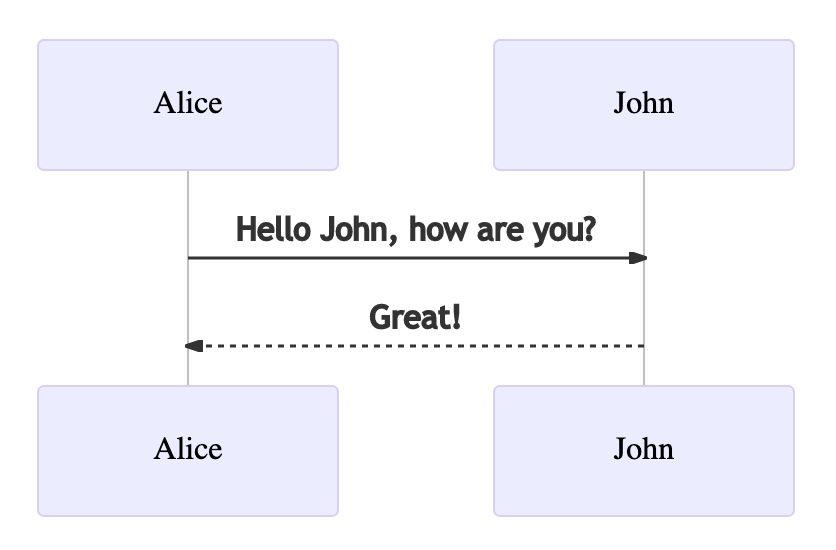
<p>Diagrams with mermaid, make sure it is enabled in the <code class="language-plaintext highlighter-rouge">_config.yml</code>.
Here is a simple example:</p>

<div class="language-html highlighter-rouge"><div class="highlight"><pre class="highlight"><code><span class="c">&lt;!-- To generate a diagram --&gt;</span>
<span class="nt">&lt;div</span> <span class="na">class=</span><span class="s">"mermaid"</span><span class="nt">&gt;</span>
sequenceDiagram
    Alice-&gt;&gt;John: Hello John, how are you?
    John--&gt;&gt;Alice: Great!
<span class="nt">&lt;/div&gt;</span>
</code></pre></div></div>

<blockquote>
  <p>💡 Now render also work with the GitHub markdown highlight.</p>
</blockquote>

<figure class="highlight"><pre><code class="language-markdown" data-lang="markdown"><span class="p">```</span><span class="nl">mermaid
</span><span class="sb">sequenceDiagram
    Alice-&gt;&gt;John: Hello John, how are you?
    John--&gt;&gt;Alice: Great!</span>
<span class="p">```</span></code></pre></figure>

<p>That will be rendered into this:</p>

<figure class="row">
    
    <div class="column">
        <img class="single" src="/Type-on-Strap-master/assets/img/mermaid-example.png" alt="mermaid-example.png" />
    </div>
    
    
    <figcaption class="caption-style"></figcaption>
</figure>

<p>You can also go with more complex features and diagrams from the <a href="https://mermaid-js.github.io/mermaid/">documentation</a>,
and try it out with the <a href="https://mermaid.live/">live editor</a>.</p>

<h3 id="sequencediagram">SequenceDiagram</h3>

<div class="mermaid">
sequenceDiagram
    participant Alice
    participant Bob
    Alice-&gt;&gt;John: Hello John, how are you?
    loop Healthcheck
        John-&gt;&gt;John: Fight against hypochondria
    end
    Note right of John: Rational thoughts prevail!
    John--&gt;&gt;Alice: Great!
    John-&gt;&gt;Bob: How about you?
    Bob--&gt;&gt;John: Jolly good!
</div>

<h3 id="flow">Flow</h3>

<pre><code class="language-mermaid">%%{
  init: {
    'theme': 'base',
    'themeVariables': {
      'lineColor': '#F8B229'
    }
  }
}%%

flowchart TD
    A[Christmas] --&gt;|Get money| B(Go shopping)
    B --&gt; C{Let me think}
    C --&gt;|One| D[Laptop]
    D ~~~ E
    C --&gt;|Two| E[iPhone]
    C --&gt;|Three| F[fa:fa-car Car]
    %% Grinch
</code></pre>

<h3 id="class">Class</h3>

<pre><code class="language-mermaid">%%{
  init: {
    'theme': 'base',
    'themeVariables': {
      'lineColor': '#F8B229'
    }
  }
}%%

classDiagram
    Animal &lt;|-- Duck
    Animal &lt;|-- Fish
    Animal &lt;|-- Zebra
    Animal : +int age
    Animal : +String gender
    Animal: +isMammal()
    Animal: +mate()
    class Duck{
      +String beakColor
      +swim()
      +quack()
    }
    class Fish{
      -int sizeInFeet
      -canEat()
    }
    class Zebra{
      +bool is_wild
      +run()
    }
</code></pre>

<h3 id="state">State</h3>

<pre><code class="language-mermaid">%%{
  init: {
    'theme': 'base',
    'themeVariables': {
      'lineColor': '#F8B229'
    }
  }
}%%

stateDiagram-v2
    [*] --&gt; Still
    Still --&gt; [*]
    Still --&gt; Moving
    Moving --&gt; Still
    Moving --&gt; Crash
    Crash --&gt; [*]
</code></pre>

<h3 id="er">ER</h3>

<pre><code class="language-mermaid">erDiagram
    CUSTOMER }|..|{ DELIVERY-ADDRESS : has
    CUSTOMER ||--o{ ORDER : places
    CUSTOMER ||--o{ INVOICE : "liable for"
    DELIVERY-ADDRESS ||--o{ ORDER : receives
    INVOICE ||--|{ ORDER : covers
    ORDER ||--|{ ORDER-ITEM : includes
    PRODUCT-CATEGORY ||--|{ PRODUCT : contains
    PRODUCT ||--o{ ORDER-ITEM : "ordered in"
</code></pre>

<h3 id="gantt">Gantt</h3>

<pre><code class="language-mermaid">gantt
    title A Gantt Diagram
    dateFormat  YYYY-MM-DD
    section Section
    A task           :a1, 2014-01-01, 30d
    Another task     :after a1  , 20d
    section Another
    Task in sec      :2014-01-12  , 12d
    another task      : 24d
</code></pre>

<h3 id="user-journey">User Journey</h3>

<pre><code class="language-mermaid">journey
    title My working day
    section Go to work
      Make tea: 5: Me
      Go upstairs: 3: Me
      Do work: 1: Me, Cat
    section Go home
      Go downstairs: 5: Me
      Sit down: 3: Me
</code></pre>

<h3 id="git">Git</h3>

<pre><code class="language-mermaid">gitGraph
    commit
    commit
    branch develop
    checkout develop
    commit
    commit
    checkout main
    merge develop
    commit
    commit
</code></pre>

<h3 id="pie">Pie</h3>

<pre><code class="language-mermaid">pie title Pets adopted by volunteers
    "Dogs" : 386
    "Cats" : 85
    "Rats" : 15
</code></pre>

<h3 id="mindmap">Mindmap</h3>

<pre><code class="language-mermaid">mindmap
  root((mindmap))
    Origins
      Long history
      ::icon(fa fa-book)
      Popularisation
        British popular psychology author Tony Buzan
    Research
      On effectivness&lt;br/&gt;and features
      On Automatic creation
        Uses
            Creative techniques
            Strategic planning
            Argument mapping
    Tools
      Pen and paper
      Mermaid
</code></pre>

<h3 id="quadrantchart">QuadrantChart</h3>

<pre><code class="language-mermaid">quadrantChart
    title Reach and engagement of campaigns
    x-axis Low Reach --&gt; High Reach
    y-axis Low Engagement --&gt; High Engagement
    quadrant-1 We should expand
    quadrant-2 Need to promote
    quadrant-3 Re-evaluate
    quadrant-4 May be improved
    Campaign A: [0.3, 0.6]
    Campaign B: [0.45, 0.23]
    Campaign C: [0.57, 0.69]
    Campaign D: [0.78, 0.34]
    Campaign E: [0.40, 0.34]
    Campaign F: [0.35, 0.78]
</code></pre>

<h3 id="xychart">XYChart</h3>

<pre><code class="language-mermaid">    xychart-beta
    title "Sales Revenue"
    x-axis [jan, feb, mar, apr, may, jun, jul, aug, sep, oct, nov, dec]
    y-axis "Revenue (in $)" 4000 --&gt; 11000
    bar [5000, 6000, 7500, 8200, 9500, 10500, 11000, 10200, 9200, 8500, 7000, 6000]
    line [5000, 6000, 7500, 8200, 9500, 10500, 11000, 10200, 9200, 8500, 7000, 6000]
</code></pre>]]></content><author><name></name></author><category term="Mermaid" /><summary type="html"><![CDATA[Mermaid]]></summary></entry><entry><title type="html">Markdown and HTML</title><link href="https://desa-eapd.github.io//Type-on-Strap-master/syntax/2014/11/28/markdown-and-html.html" rel="alternate" type="text/html" title="Markdown and HTML" /><published>2014-11-28T00:00:00+00:00</published><updated>2014-11-28T00:00:00+00:00</updated><id>https://desa-eapd.github.io//Type-on-Strap-master/syntax/2014/11/28/markdown-and-html</id><content type="html" xml:base="https://desa-eapd.github.io//Type-on-Strap-master/syntax/2014/11/28/markdown-and-html.html"><![CDATA[<p>Jekyll supports the use of <a href="http://daringfireball.net/projects/markdown/syntax">Markdown</a> with inline HTML tags which makes it easier to quickly write posts with Jekyll, without having to worry too much about text formatting. A sample of the formatting follows.</p>

<h2 id="table-of-content">Table of content</h2>

<!-- To be placed at the beginning of the post, it is where the table of content will be generated -->
<ul>
  <li>TOC</li>
  <li>You need to put this at the beginning of the page where you want the table of content to be displayed</li>
</ul>

<div class="language-html highlighter-rouge"><div class="highlight"><pre class="highlight"><code>* TOC
{:toc}
</code></pre></div></div>

<p>It will then render the markdown and html titles (lines that begins with <code class="language-plaintext highlighter-rouge">#</code> or using the <code class="language-plaintext highlighter-rouge">&lt;h1&gt;&lt;/h1&gt;</code> tages)</p>

<h2 id="title">Title</h2>

<h3 id="subtitle">Subtitle</h3>

<p>Tables have also been extended from Markdown:</p>

<table>
  <thead>
    <tr>
      <th>First Header</th>
      <th>Second Header</th>
    </tr>
  </thead>
  <tbody>
    <tr>
      <td>Content Cell</td>
      <td>Content Cell</td>
    </tr>
    <tr>
      <td>Content Cell</td>
      <td>Content Cell</td>
    </tr>
  </tbody>
</table>

<p>Here’s an example of an image, which is included using Markdown:</p>

<p><img src="/Type-on-Strap-master/assets/img/pexels/book-glass.jpeg" alt="Image of a glass on a book" /></p>

<p>This is another example of list:</p>

<ul>
  <li>list of things
    <ol>
      <li>Sub list</li>
      <li>of Other things</li>
      <li>with numbers</li>
    </ol>
  </li>
  <li>And many more
    <ul>
      <li>Sub sub list
        <ul>
          <li>can go on …
            <ul>
              <li>and on …
                <ul>
                  <li>and on !</li>
                </ul>
              </li>
            </ul>
          </li>
        </ul>
      </li>
      <li>That’s it.</li>
    </ul>
  </li>
</ul>

<h3 id="other-subtitle">Other subtitle</h3>

<p>Highlighting for code in Jekyll is done using Base16 or Rouge. This theme makes use of Rouge by default.</p>

<figure class="highlight"><pre><code class="language-js" data-lang="js"><span class="c1">// count to ten</span>
<span class="k">for</span> <span class="p">(</span><span class="kd">var</span> <span class="nx">i</span> <span class="o">=</span> <span class="mi">1</span><span class="p">;</span> <span class="nx">i</span> <span class="o">&lt;=</span> <span class="mi">10</span><span class="p">;</span> <span class="nx">i</span><span class="o">++</span><span class="p">)</span> <span class="p">{</span>
    <span class="nx">console</span><span class="p">.</span><span class="nx">log</span><span class="p">(</span><span class="nx">i</span><span class="p">);</span>
<span class="p">}</span>

<span class="c1">// count to twenty</span>
<span class="kd">var</span> <span class="nx">j</span> <span class="o">=</span> <span class="mi">0</span><span class="p">;</span>
<span class="k">while</span> <span class="p">(</span><span class="nx">j</span> <span class="o">&lt;</span> <span class="mi">20</span><span class="p">)</span> <span class="p">{</span>
    <span class="nx">j</span><span class="o">++</span><span class="p">;</span>
    <span class="nx">console</span><span class="p">.</span><span class="nx">log</span><span class="p">(</span><span class="nx">j</span><span class="p">);</span>
<span class="p">}</span></code></pre></figure>

<h3 id="math">Math</h3>

<p>Type on Strap uses KaTeX to display maths. Equations such as \(S_n = a \times \frac{1-r^n}{1-r}\) can be displayed inline.</p>

<p>Alternatively, they can be shown on a new line:</p>

\[f(x) = \int \frac{2x^2+4x+6}{x-2}\]

<p>And in your markdown file:</p>

<div class="language-markdown highlighter-rouge"><div class="highlight"><pre class="highlight"><code>$$ f(x) = <span class="se">\i</span>nt <span class="se">\f</span>rac{2x^2+4x+6}{x-2} $$
</code></pre></div></div>

<h3 id="expandable-content">Expandable content</h3>

<p>Click on the expandable content to display it:</p>

<details>
    <summary>Click here!</summary>
    Now you see me
</details>

<p>And in your markdown file:</p>

<div class="language-html highlighter-rouge"><div class="highlight"><pre class="highlight"><code><span class="nt">&lt;details&gt;</span>
    <span class="nt">&lt;summary&gt;</span>Click here!<span class="nt">&lt;/summary&gt;</span>
    Now you see me
<span class="nt">&lt;/details&gt;</span>
</code></pre></div></div>]]></content><author><name>Rohan Chandra</name></author><category term="Syntax" /><category term="Katex" /><category term="Markdown" /><summary type="html"><![CDATA[Jekyll supports the use of Markdown with inline HTML tags which makes it easier to quickly write posts with Jekyll, without having to worry too much about text formatting. A sample of the formatting follows.]]></summary></entry><entry><title type="html">What’s your title</title><link href="https://desa-eapd.github.io//Type-on-Strap-master/2014/11/27/whats-your-title.html" rel="alternate" type="text/html" title="What’s your title" /><published>2014-11-27T00:00:00+00:00</published><updated>2014-11-27T00:00:00+00:00</updated><id>https://desa-eapd.github.io//Type-on-Strap-master/2014/11/27/whats-your-title</id><content type="html" xml:base="https://desa-eapd.github.io//Type-on-Strap-master/2014/11/27/whats-your-title.html"><![CDATA[<p>This is an example of a post which includes a feature image that has a
text, where you don’t want to redisplay the title.
Mind your image size in order for the text to be displayed where you want it to.
The only limit is your imagination.</p>

<p>Here is how the yaml looks inside the post:</p>

<div class="language-yml highlighter-rouge"><div class="highlight"><pre class="highlight"><code><span class="na">title</span><span class="pi">:</span> <span class="s">What's your title</span>
<span class="na">hide_title</span><span class="pi">:</span> <span class="no">true</span>
<span class="na">feature-img</span><span class="pi">:</span> <span class="s">assets/img/feature-img/story.jpeg</span>
<span class="na">author</span><span class="pi">:</span> <span class="s">mhagnumdw</span>
<span class="na">tags</span><span class="pi">:</span> <span class="pi">[</span><span class="nv">Test</span><span class="pi">,</span> <span class="nv">Lorem</span><span class="pi">]</span>
</code></pre></div></div>

<p>You may wonder, why is there a title when you are not actually displaying it. <br />
Well that’s due to some jekyll limitation:</p>

<blockquote>
  <p>You <strong>can’t</strong> set the <strong>title</strong> to the <strong>empty string</strong></p>
</blockquote>

<p>The title is used elsewhere than inside the post, for example in the blog page that list this post.
An empty title would break those pages and possibly prevents jekyll to render your blog.</p>]]></content><author><name>Mhagnumdw</name></author><category term="Test" /><category term="Image" /><summary type="html"><![CDATA[This is an example of a post which includes a feature image that has a text, where you don’t want to redisplay the title. Mind your image size in order for the text to be displayed where you want it to. The only limit is your imagination.]]></summary></entry><entry><title type="html">The Real Lorem Ipsum</title><link href="https://desa-eapd.github.io//Type-on-Strap-master/demo/2014/11/26/lorem-ipsum.html" rel="alternate" type="text/html" title="The Real Lorem Ipsum" /><published>2014-11-26T00:00:00+00:00</published><updated>2014-11-26T00:00:00+00:00</updated><id>https://desa-eapd.github.io//Type-on-Strap-master/demo/2014/11/26/lorem-ipsum</id><content type="html" xml:base="https://desa-eapd.github.io//Type-on-Strap-master/demo/2014/11/26/lorem-ipsum.html"><![CDATA[<h2 id="lorem-ipsum">Lorem Ipsum</h2>

<p>from <em>“de Finibus Bonorum et Malorum”</em> written by Cicero in 45 BC.
 <!--more-->
Find out more on <a href="https://www.lipsum.com/">lipsum.com</a>. And if you like colors, check out the <a href="https://www.w3schools.com/colors/colors_trends.asp">http color trends</a> from w3schools.</p>

<h3 id="the-standard-lorem-ipsum-passage-since-1500s">The standard Lorem Ipsum passage (since 1500s)</h3>

<p>“Lorem ipsum dolor sit amet, consectetur adipiscing elit, sed do eiusmod tempor incididunt ut labore et dolore magna aliqua. Ut enim ad minim veniam, quis nostrud exercitation ullamco laboris nisi ut aliquip ex ea commodo consequat. Duis aute irure dolor in reprehenderit in voluptate velit esse cillum dolore eu fugiat nulla pariatur. Excepteur sint occaecat cupidatat non proident, sunt in culpa qui officia deserunt mollit anim id est laborum.”</p>

<h3 id="section-11032">Section 1.10.32</h3>

<h4 id="latin">Latin</h4>
<p>“Sed ut perspiciatis unde omnis iste natus error sit voluptatem accusantium doloremque laudantium, totam rem aperiam, eaque ipsa quae ab illo inventore veritatis et quasi architecto beatae vitae dicta sunt explicabo. Nemo enim ipsam voluptatem quia voluptas sit aspernatur aut odit aut fugit, sed quia consequuntur magni dolores eos qui ratione voluptatem sequi nesciunt. Neque porro quisquam est, qui dolorem ipsum quia dolor sit amet, consectetur, adipisci velit, sed quia non numquam eius modi tempora incidunt ut labore et dolore magnam aliquam quaerat voluptatem. Ut enim ad minima veniam, quis nostrum exercitationem ullam corporis suscipit laboriosam, nisi ut aliquid ex ea commodi consequatur? Quis autem vel eum iure reprehenderit qui in ea voluptate velit esse quam nihil molestiae consequatur, vel illum qui dolorem eum fugiat quo voluptas nulla pariatur?”</p>

<h4 id="translation-by-h-rackham-1914">Translation by H. Rackham (1914)</h4>
<p>“But I must explain to you how all this mistaken idea of denouncing pleasure and praising pain was born and I will give you a complete account of the system, and expound the actual teachings of the great explorer of the truth, the master-builder of human happiness. No one rejects, dislikes, or avoids pleasure itself, because it is pleasure, but because those who do not know how to pursue pleasure rationally encounter consequences that are extremely painful. Nor again is there anyone who loves or pursues or desires to obtain pain of itself, because it is pain, but because occasionally circumstances occur in which toil and pain can procure him some great pleasure. To take a trivial example, which of us ever undertakes laborious physical exercise, except to obtain some advantage from it? But who has any right to find fault with a man who chooses to enjoy a pleasure that has no annoying consequences, or one who avoids a pain that produces no resultant pleasure?”</p>

<h3 id="section-11033">Section 1.10.33</h3>

<h4 id="latin-1">Latin</h4>

<p>“At vero eos et accusamus et iusto odio dignissimos ducimus qui blanditiis praesentium voluptatum deleniti atque corrupti quos dolores et quas molestias excepturi sint occaecati cupiditate non provident, similique sunt in culpa qui officia deserunt mollitia animi, id est laborum et dolorum fuga. Et harum quidem rerum facilis est et expedita distinctio. Nam libero tempore, cum soluta nobis est eligendi optio cumque nihil impedit quo minus id quod maxime placeat facere possimus, omnis voluptas assumenda est, omnis dolor repellendus. Temporibus autem quibusdam et aut officiis debitis aut rerum necessitatibus saepe eveniet ut et voluptates repudiandae sint et molestiae non recusandae. Itaque earum rerum hic tenetur a sapiente delectus, ut aut reiciendis voluptatibus maiores alias consequatur aut perferendis doloribus asperiores repellat.”</p>

<h4 id="translation-by-h-rackham-1914-1">Translation by H. Rackham (1914)</h4>

<p>“On the other hand, we denounce with righteous indignation and dislike men who are so beguiled and demoralized by the charms of pleasure of the moment, so blinded by desire, that they cannot foresee the pain and trouble that are bound to ensue; and equal blame belongs to those who fail in their duty through weakness of will, which is the same as saying through shrinking from toil and pain. These cases are perfectly simple and easy to distinguish. In a free hour, when our power of choice is untrammelled and when nothing prevents our being able to do what we like best, every pleasure is to be welcomed and every pain avoided. But in certain circumstances and owing to the claims of duty or the obligations of business it will frequently occur that pleasures have to be repudiated and annoyances accepted. The wise man therefore always holds in these matters to this principle of selection: he rejects pleasures to secure other greater pleasures, or else he endures pains to avoid worse pains.”</p>]]></content><author><name></name></author><category term="Demo" /><category term="Image" /><category term="Color" /><summary type="html"><![CDATA[Lorem Ipsum from “de Finibus Bonorum et Malorum” written by Cicero in 45 BC.]]></summary></entry></feed>